

Disclaimer
| 0 comments

1. None of the files listed in this website are hosted on the server of yourstations.tk. All the files are hosted on external file hosts.
2. All the contents in this website are for personal use only.
3. If you’re member of any anti-piracy, government, corporation or related group or organization, you are not allowed to enter this site and view any of site contents.
4.Some videos and contents are to their respectful owners. No copyright infringement intended. Some videos are linked for youtube.com, justin.tv, ustream, etc.
yourstations claims no credit for any images featured on this site unless otherwise noted.
5. If you think any of the contents of this site infringes any intellectual property law and you hold the copyright of that content please report it to a.station84@yahoo.com the content will be removed as soon as posible.

The Passion of the Christ
| 0 comments

A depiction of the last twelve hours in the life of Jesus of Nazareth, on the day of his crucifixion in Jerusalem. The story opens in the Garden of Olives where Jesus has gone to pray after the Last Supper. Betrayed by Judas Iscariot, the controversial Jesus--who has performed 'miracles' and has publicly announced that he is 'the Son of God'--is arrested and taken back within the city walls of Jerusalem. There, the leaders of the Pharisees confront him with accusations of blasphemy; subsequently, his trial results with the leaders condemning him to his death. Jesus is brought before Pontius Pilate, the Roman Governor of Palestine, for his sentencing. Pilate listens to the accusations leveled at Jesus by the Pharisees. Realizing that his own decision will cause him to become embroiled in a political conflict, Pilate defers to King Herod in deciding the matter of how to persecute Jesus.

Ah! My Goddess S1 [Complete 1-26] | 80MB | 400p | Dual Audio
| 0 comments
Ah! My Goddess S1
Ah! My Goddess S1 [400p | Dual Audio]
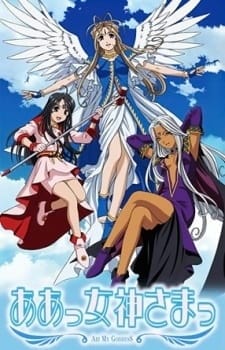
Type: TV
Episodes: 26
Status: Finished Airing
Aired: Jan 7, 2005 to Jul 8, 2005
Producers: Bandai Visual, AIC, TBS, Media BlastersL
Genres: Comedy, Magic, Romance, Supernatural
Duration: 24 min. per episode
Rating: PG-13 – Teens 13 or older
Summary:
Keiichi Morisato is looking forward to university life. But in reality, he has no luck in anything, and he has trouble with clubs, love, etc. The truth is that he has an unlucky star above his head. One day, Keiichi is stuck watching the dorm while his sempai are away, and has a mountain of chores to do to boot. But Keiichi is a good-natured person, and is set about doing his duties. As he is about to finish his final chore, he makes a phone call to his sempai. But the words that came through the receiver are, 'Goddess Help Line.' Shortly afterwards, a beautiful goddess named Belldandy appears in front of him from the mirror of his room.
See instruction for subs at end
Download Links:

AOT Ah! My Goddess S1 26 400p dual audio.mkv
Instruction to use Subs
Instruction to use Subs
- download the sub file zip Click Here
- Extract all Episode subs
- load/open the sub tracks from it
New Hell striker for s60v3
| 0 comments

Game Testing:
Model: n95
New icon: World Road 2 red icon (Nice one, than the first test version of white fuzzy icon Shuai)
Genre: ARPG (and the SIS version of transplantation Paladin and some of them fight)
Landscape and white screen!
People like ninja .. very handsome, and Huo Ying endured years of Kakashi a bit like ...
Game size: 11Mb...22Mb after installed (more than the first test version is about 4M)
Game control: Wang Ping (volume can switch, but can not adjust the size of .. sorry ..)
Characters in dialogue, to play up Gengshuang!
.. So much time being tested ..
Working Fine On S60v3 All devices Like N95 And N73..
PREVIEW TRAILER
http://www.tudou.com/v/7WLTqwJ_MW4
Download Link:http://www.mediafire.com/?zdmegyizlkk


Quick Tip: How to Create an Abstract Wireframe Text Effect
| 0 comments
Tutorial Details
Program: Adobe Photoshop CS2+
Difficulty: Beginner
Estimated Completion Time: 20 Minutes
Step 1
Let’s start by creating a new document which is 900 px wide and and 600 px high at a resolution of 300 pixels/inch. Make sure the Color Mode is set to RGB.

Step 2
Fill the “Background” layer with Black. Get the Type Tool and type your text. I wrote “ABSENT”. I used Futura Md BT font, set Font Style to Medium and Font Size to 220 px. I also set the Tracking to 20 to increase the space between letters. Make sure the Text Color is set to White.

Step 3
While the text layer is selected on the Layers Palette, hit Command/Ctrl + E to merge the text and the "Background" layers.

Step 4
Now go to Filter > Distort > Wave and use these settings: Type: Square, Number of Generators: 1, Max Wavelength: 635, Min. Wavelength: 257, Max. Amplitude: 141, Min. Amplitude: 62, Horiz. Scale: 24% and Vert. Scale: 22%. Now you’ll have a pretty distorted text. Please keep in mind that the result depends on these parameters as well as the size, tracking and position of the text.

Step 5
We’ll add another displacement effect to our text and we’re going to use Fragment filter for that. Go to Filter > Pixelate > Fragment.

Step 6
Now go to Filter > Stylize > Glowing Edges, set Edge Width to 1, Edge Brightness to 6 and Smoothness to 1.

Step 7
We’re going to copy this image to a new alpha channel and make a selection out of it. First hit Command/Ctrl + A to select the whole layer, hit Command/Ctrl + C to copy. Then go to the Channels Panel create a new channel and hit Command/Ctrl + V to paste. Command/Ctrl-click on the Alpha 1 channel thumbnail to get the white pixels selected.

Step 8
Now go back to the Layers Panel. Create a new layer and name it "Text". Fill the selection with White, hit Command/Ctrl + D to deselect. Go to the "Background" layer and fill it with Black. Now we’ll apply a Layer Style to "Text" layer. Select the "Text" layer in the Layers Panel and apply a Gradient Overlay using these settings: Blend Mode set to Normal, Opacity set to 15%, Gradient set to Blue, Red, Yellow, Angle set to 140 and Scale at 150%. Select the “Background” layer in the Layers Panel and create a new layer. Select both “Layer 1″ and “Text” layers, hit Command/Ctrl + E to merge selected layers. Now the layer style we’ve just applied is merged with the layer.

Step 9
It is time to add some lighting effects now. Duplicate the “Text” layer by hitting Command/Ctrl + J. Go to Filter > Blur > Gaussian Blur and apply with a Radius of 4 pixels. Hit Command/Ctrl + J again to duplicate the “Text copy” layer. Set Blend Mode to Overlay and hit Command/Ctrl + J once again to duplicate the “Text copy 2″ layer.

Step 10
Select “Text copy” layer in the Layers Panel and duplicate it. Drag the “Text copy 4″ layer just above the “Background” layer. Go to Filter > Blur > Gaussian Blur and apply with a Radius of 6 pixels. Then go to Image > Adjustments > Hue/Saturation and use these settings: Colorize: Checked, Hue: 315, Saturation: 38 and Lightness: -30.

Step 11
Now we’ll create the background. Create a new layer above the “Background” layer and name it “Lights”. Get the Gradient Tool, pick Foreground to Transparent and set to Radial Graident. Zoom out and apply gradients starting from outside the canvas as shown in the below image. You can use the colors shown below as well as you can pick your own.

Step 12
Create a new layer above the “Lights” layer and name it "Circles". Get the Brush Tool, pick one of the standart round brushes and open the Brushes Panel and change the settings as shown below.

Step 13
Set Foreground Color to #3fc5c6 and Background Color to #ad4cb1. Paint the "Circles" layer with random brush moves.

Step 14
Now go to Filter > Blur > Surface Blur, set Radius to 25 pixels, set Threshold to 175 levels and apply. Then go to Filter > Blur > Gaussian Blur and apply with a Radius of 4 pixels.

Step 15
Set the Opacity of the “Circles” layer to 15 and this is what we have so far.

Step 16
Finally, we’ll add some text to our design. I placed a clear "ABSENT" text and a subhead text using the same font we’ve used before.

Final Image
Here is the final image. I hope you liked this tutorial and the techniques you learned will come in handy for your own designs.

Pandora Hearts
| 0 comments

Format: MP4
Resolution: 320x240
Language: Jap w/ Eng Subs
File Size: Max. of 33MB
Genre: adventure, fantasy, mystery
Themes: Alice in Wonderland, family, monsters, social classes, Through the Looking Glass
Plot Summary: Oz Bezarius, heir to one of the duke houses, has just turned fifteen. His life is rich and carefree, darkened only
by the constant absence of his father. At his coming-of-age ceremony, however, everything changes. For no reason that he can discern,
he's cast into the prison known as the "Abyss", only to be saved by a "chain" known as Alice, the bloodstained black rabbit. It is unknown
why was he cast into Abyss, how does Alice factor into it all, and what does the organization known as "Pandora" want with him.
Episode 1 "Innocent Calm"
Episode 2 "Tempest of Conviction"
Episode 3 "Prisoner & Alichino"
Episode 4 "Rendezvous"
Episode 5 "Clockwise Doom."
Episode 6 "Where am I?"
Episode 7 "Whisperer"
Episode 8 "Question"
Episode 9 "Malediction"
Episode 10 "Grim"
Episode 11 "A Lost Raven"
Episode 12 "Welcome to Labyrinth"
Episode 13 "Keeper of the Secret"
Episode 14 "Hollow Eye Socket"
Episode 15 "Who Killed Poor Alice?"
Episode 16 "His Name is..."
Episode 17 "Hello My Sister!"
Episode 18 "Eliot & Leo"
Episode 19 "The Pool of Tears"
Episode 20 "Modulation"
Episode 21 "Snow White Chaos"
Episode 22 "Countervalue of Loss"
Episode 23 "A Warp in the World"
Episode 24 "Kyrie"
Episode 25 "Beyond the Winding Road"
Omamori Himari
| 0 comments

Format: MP4
Resolution: 320x240
Language: Jap w/ Eng Subs
File Size: Max. of 33MB
Genres: action, comedy, romance
Themes: ayakashi, catgirls, ecchi, fanservice, harem
Plot Summary: The slapstick romantic comedy centers around an ordinary 16-year-old high school boy named Yūto Amakawa who is protected by a spirit — specifically, a beautiful, sword-wielding cat girl spirit named Himari.
Yūto is descended from a family that has subjugated demons since time immemorial. The charm that once protected him is now impotent, but fortunately, at that same moment, Himari appears before him as his new guardian.
Episode 1 "Cat and Girl and Allergy"
Episode 2 "Sea Cat Scramble"
Episode 3 "Maid in Cat"
Episode 4 "The White Cat of Noihara"
Episode 5 "A Troubled Cat and Composure"
Episode 6 "Kiss x Cat x KISS"
Episode 7 "The Cat's Feelings and the Witch's Melancholy"
Episode 8 "Curiosity killed the cat"
Episode 9 "The Cat in the Approaching Darkness"
Episode 10 "The Cat Demon's Feelings"
Episode 11 "Himari, as the Protective Sword…"
Episode 12 "Cats, Yuto, and a Maiden's Pure Heart"
Nogizaka Haruka no Himitsu
| 0 comments

Format: MP4
Resolution: 320x240
Language: Jap w/ Eng Subs
File Size: Max. of 34MB
Genre: comedy, romance
Themes: fanservice, high school, otaku
Plot Summary: Nogizaka Haruka no Himitsu centers around Yūto Ayase and Haruka Nogizaka. Yūto is seemingly ordinary,
but Haruka is attractive, intelligent, and rich, which prompts other students to idolize her and even give her French
nicknames like "Nuit Étoile" (The Silver Star of the Night) and "Lumière du Clavier" (The Shining Princess on the Piano).
One day, Yūto wanders into the school library in order to return a book and accidentally stumbles upon Haruka's deepest,
darkest secret: she is a diehard fan of anime and manga, in other words, a regular otaku. Promising Haruka to keep this a
secret, Yūto becomes her advisor and confidente of some sort and hangs out with her more, though earning some viciously
envious glares from his fellow schoolmates.
Season 1
Episode 1 "It's All Over..."
Episode 2 "My First Time..."
Episode 3 "It's Over..."
Episode 4 "Is it Weird...?"
Episode 5 "If You Look at Me Like That..."
Episode 6 "It's...the Summer Comiket"
Episode 7 "...I Love It!"
Episode 8 "...Big Bro ☆"
Episode 9 "I Was Happy..."
Episode 10 "I Want to Be Together..."
Episode 11 "...Sorry For The Wait"
Episode 12 "It's a Secret!"
Season 2
Episode 1 "I Want to Go Together..."
Episode 2 "Please Put It In..."
Episode 3 "Ah, It Hurts..."
Episode 4 "Yūto's Scent..."
Episode 5 "...It's Good..."
Episode 6 "My Body Feels Hot..."
Episode 7 "It Might Have Gone In..."
Episode 8 "I'll Do It For You..."
Episode 9 "This is My First Experience ☆"
Episode 10 "I Didn't Expect It to Turn Into This..."
Episode 11 "I Want to Keep Feeling It..."
Episode 12 "It's a Promise"
Naruto/One Piece/Dragon Ball/Street Fighter Wallpapers
| 0 comments
Note: All the wallpapers are of very high quality at 1920x1080 resolution and will fit both 4:3 and 16:9 resolutions well with the 'fill' setting available in windows 7.
Installation: Just the file and run the .themepack file.
Street Fighter X Tekken


http://www.mediafire.com/download.php?y38ydz6xedj9vp4
Dragon Ball Z

http://www.mediafire.com/download.php?vlllljn7e3m8eaj
Naruto Shippuden

http://www.mediafire.com/download.php?87q6qo2dgoylgxc
One Piece

http://www.mediafire.com/download.php?9yypgfjzcddituq
Password: jhaizel11.com
Installation: Just
the file and run the .themepack file.Street Fighter X Tekken
http://www.mediafire.com/download.php?y38ydz6xedj9vp4
Dragon Ball Z
http://www.mediafire.com/download.php?vlllljn7e3m8eaj
Naruto Shippuden
http://www.mediafire.com/download.php?87q6qo2dgoylgxc
One Piece
http://www.mediafire.com/download.php?9yypgfjzcddituq
Password: jhaizel11.com
Tutorial How to Hide Disk Partition, Anti-Hack way
| 0 comments
This is the simple step how to Hide Extended Disk Partition.


This is my screenshot on My Computer that my extended partion is here
i try to hide the partion (F:)Picture

Now Let`s Proceed. We are using DISKPART Command.
1.Press Start and press Run
2.Type "diskpart" then press ok
3.Now type the list volume and find the drive that you want to Hide ( I will Hide the Drive F: )
4.Type select volume 6(my drive f: is letter 6)
5.Type remove letter f and hit enter

6.And my drive F is already Hiding now

How to Back your Drive Again?
Just Follow the procedure 1-4, instead "remove letter f" just type "assign letter f"


Secret Garden(Complete)
| 0 comments

Information
Genre: Romance
Category: Korean Drama
Film Date: November, 2010
Episodes: 20
Synopsis
The drama tells the story of Kim Joo Won (Hyun Bin), an arrogant and eccentric CEO who maintains the image of seeming perfection, and Gil Ra Im (Ha Ji Won), a poor and humble stuntwoman whose beauty and body are the object of envy amongst top actresses. Their accidental meeting, when Joo Won mistakes Ra Im for actress Park Chae Rin, marks the beginning of a tense, bickering relationship, through which Joo Won tries to hide a growing attraction to Ra Im that both confuses and disturbs him. To complicate matters further, a strange sequence of events results in them swapping bodies.
Cast
Ha Ji-won as Gil Ra Im
Hyun Bin as Kim Joo-won
Yoon Sang Hyun as Choi Woo Young/Oska (Joo Won's cousin)
Kim Sa-rang as Yoon Seul
Lee Philip as Im Jong Soo
[edit]Extended Cast
Lee Jong Suk as Han Tae Sun
Yoo In-na as Im Ah Young
Kim Ji Sook as Moon Yeon Hong
Park Joon Geum as Moon Boon Hong
Kim Sung Oh (김성오) as Secretary Kim (Kim Sung Oh)
Choi Yoon So as Kim Hee Won (Joo Won's sister)
Kim Sung Kyum as Moon Chang Soo
Lee Byung Joon as Park Bong Ho
Sung Byung Sook as Park Bong Hee
Yoon Gi Won as Choi Dong Kyu
Yoo Seo Jin as Lee Ji Hyun
Kim Gun as Yoo Jong Heon
Baek Seung Hee as Park Chae Rin
Kim Dong Gyoon as director
Kim Mi Kyung as guest house ahjumma
Song Yoon Ah as herself (cameo)
Son Ye Jin as herself (cameo)
Beige (베이지) (cameo)
Kang Chan Yang (강찬양)
Jang Seo Won (장서원)
Kim Sung Hoon
Episode 1 http://www.mediafire.com/?2p34vohg26o9r7x
Episode 2 http://www.mediafire.com/?452ydi6fd3k6vk7
Episode 3 http://www.mediafire.com/?80tyeba3iop4b4a
Episode 4 http://www.mediafire.com/?25ee9411l3944s4
Episode 5 http://www.mediafire.com/?cde3q58bp5am6dp
Episode 6 http://www.mediafire.com/?fcpcj2ch1oddp1u
Episode 7 http://www.mediafire.com/?7654v3f4kh4nv6e
Episode 8 http://www.mediafire.com/?mgci2b0t0mgan7c
Episode 9 http://www.mediafire.com/?8d78jd553fdt04p
Episode 10 http://www.mediafire.com/?lqwwd7pxp41iv5v
Episode 11 http://www.mediafire.com/?y70o5r2b1lgpgao
Episode 12 http://www.mediafire.com/?s2gg99vsger2g24
Episode 13 http://www.mediafire.com/?4lndbffyq9pqf5u
Episode 14 http://www.mediafire.com/?31qu1p7f43yhte0
Episode 15 http://www.mediafire.com/?uknvbp34jbk4g0e
Episode 16 http://www.mediafire.com/?5icdchpod5supm1
Episode 17 http://www.mediafire.com/?u3jhmshvqox8l2h
Episode 18 http://www.mediafire.com/?6o41jusce4ld0oj
Episode 19 http://www.mediafire.com/?szv2of5t4x16qqe
Episode 20 http://www.mediafire.com/?px9lihold03lqv9
SPECIAL EPISODE
http://www.mediafire.com/?9zlctpepd2n3lit
GIL RA IM RINGTONE
http://www.mediafire.com/?6c5zudyvvbk24rs
Password:vergel0005
Love Story In Harvard (Complete)
| 0 comments

Genre: Drama, Romance
Category: Korean Drama
Film Date: November, 2004
Episodes: 16
Synopsis
Love Story in Harvard portrays the dream and love pursued by foreign students studying in Harvard. It demonstrates bright, hard-working, and romantic characters and storylines. A young love story set at the famed Ivy League school in the United States. Kim Hyun Woo (Kim Rae Won), a 1st year law student at Harvard Law, enters into a rivalry with classmate Hong Jung Min (Lee Jung Jin) for the affections of beautiful medical student Lee Soo In (Kim Tae Hui). The two men are both from prestigious families, while Soo In is from a poor family. Can the trio resolve their romantic differences and chase their dreams at the same time?
Cast
* Kim Rae Won as Kim Hyun-woo
* Kim Tae Hee as Lee Soo-in
* Lee Jung Jin as Hong Jung-min
* Kim Min as Yoo Jin-ah
* Extended Cast
* Joo Hyun as Lee Yong-goo (Soo-in’s father)
* Kang Nam Gil as Oh Yung-jae (law professor)
* Jung Sol Hee as Han Seul-gil
* Ben Wells as Ricky Don (Jung-min's friend)
* Suh Ji Hee
* Lee Yoo Jung
Episode 1 http://www.mediafire.com/?d556xd8lxh9n8kh
Episode 2 http://www.mediafire.com/?gw4mmqs3p4yaozb
Episode 3 http://www.mediafire.com/?l01h31lt89tdz2w
Episode 4 http://www.mediafire.com/?36vn46rbam4w799
Episode 5 http://www.mediafire.com/?0dqxbu9hv389o0f
Episode 6 http://www.mediafire.com/?37549ow75drpbbp
Episode 7 http://www.mediafire.com/?jbo93fphczo16d1
Episode 8 http://www.mediafire.com/?4674fx7wj89rxs3
Episode 9 http://www.mediafire.com/?clogo7y11h8uie0
Episode 10 http://www.mediafire.com/?j5v8dm3f3cdv003
Episode 11 http://www.mediafire.com/?bbcp9l83g217ace
Episode 12 http://www.mediafire.com/?2w822pqp4vur454
Episode 13 http://www.mediafire.com/?kfjl6fdcl6df2v3
Episode 14 http://www.mediafire.com/?az15stc7wl6tll4
Episode 15 http://www.mediafire.com/?dtu77bvjphlqibf
Episode 16 http://www.mediafire.com/?9d1n8n29091s42f
Password:vergel0005
Subscribe to:
Posts (Atom)